
Window tint & PPF pattern softwarePrecision cutting,
reimagined.
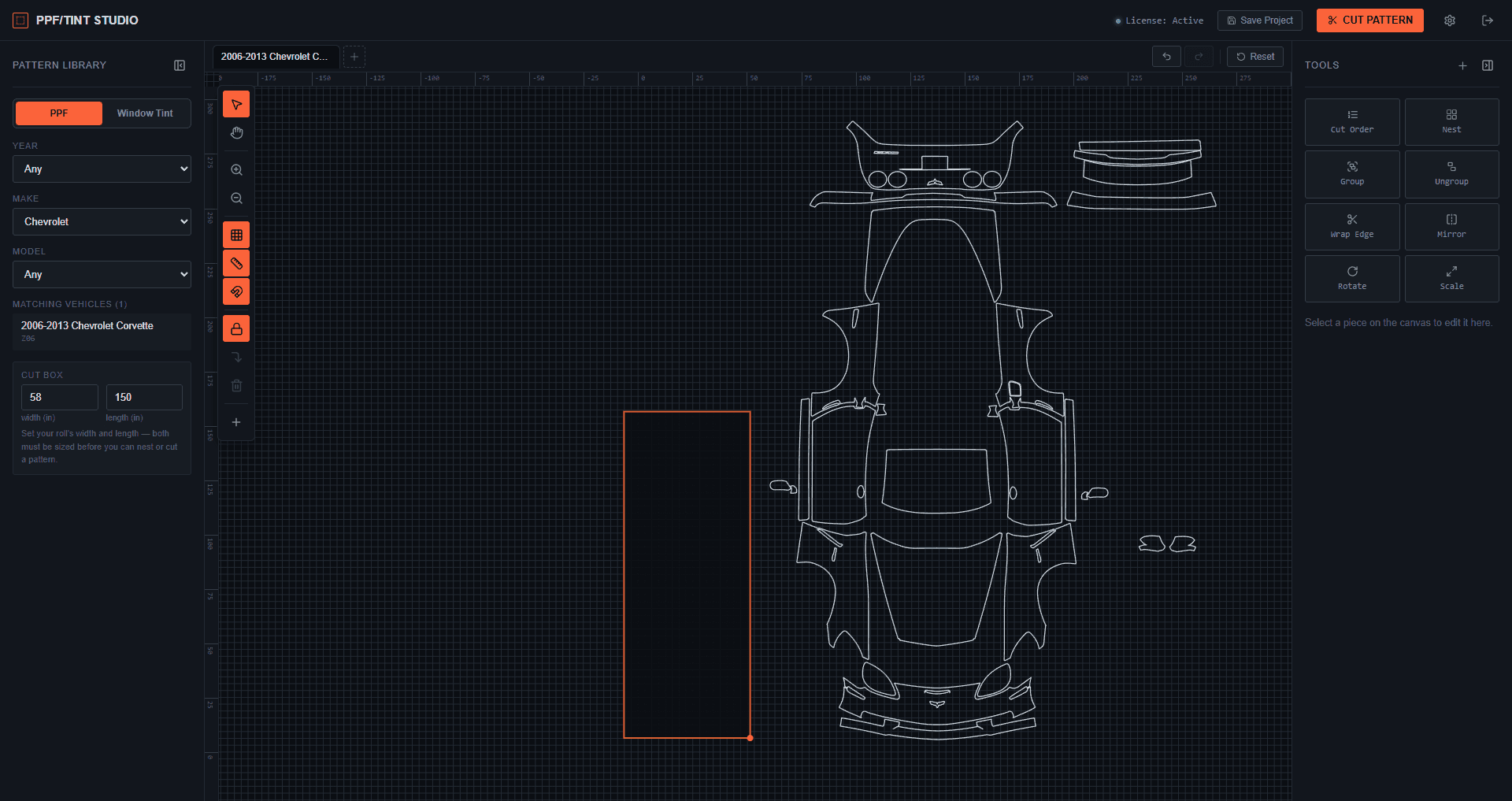
PPF/Tint Studio is pattern-cutting software for window tint and PPF shops — Auto Nesting, true cut-order control, and a growing library of vehicle patterns, in one workspace built for shops that expect more.
Starting at $60/month · Cancel anytime · No contracts
450+ shops
run PPF/Tint Studio across the US
Tested every week
new builds and beta features, shipped weekly
Growing pattern library
PPF & window tint patterns, updated constantly
Cancel anytime
no annual contracts, ever
How it works
From vehicle to cut film in four steps
Connect and calibrate your plotter
Compatible with most plotters. Link yours over USB in seconds — no extra drivers, no manual setup.
Pull a pattern from the library
Browse our extensive pattern database by year, make, and model to find the exact fit.
Select and edit to your preferences
Fine-tune with a full toolset — move, rotate, nest, and more — so you cut exactly what you need.
Send it to your cutter
Once you're ready, send the job straight to your connected plotter and cut.
Why shops switch
PPF/Tint Studio vs. traditional cutting
Traditional Cutting
Efficiency
Slow, labor-intensive
Precision
High errors
Material Waste
30-50% wasted
Skill Level
Needs skilled workers
Luxury Cars
Risky manual blade usage
Expansion & Recruitment
Hard to recruit, uneven skills
Scheduling & Appointments
Frequent delays
Store Image
Outdated, unappealing
PPF/Tint Studio
Efficiency
Fast, automated
Precision
≤0.03mm accuracy
Material Waste
Saves up to $200k/year
Skill Level
Beginner-friendly
Luxury Cars
Risk-free, pre-cut shapes
Expansion & Recruitment
Easy hiring, standardized training
Scheduling & Appointments
Precise, reliable scheduling
Store Image
Modern, attracts premium clients
What's inside
01 / 05
Pricing
Straightforward pricing. No surprises.
No annual contracts. Cancel any time — your plan just runs through its current billing period.
Window Tint Only
For shops that stick to window film.
$60/month
- Full pattern editor & Auto Nesting
- Compatible with most plotters (USB)
- Cloud project saves
- Up to 2 devices
- Window tint pattern library
Complete Access
For shops running PPF and tint side by side.
$139/month
- Full pattern editor & Auto Nesting
- Compatible with most plotters (USB)
- Cloud project saves
- Up to 2 devices
- Window tint pattern library
- PPF pattern library
- Priority pattern requests
Not ready to commit?
Try the software free for 7 days with the window tint pattern library.
Prices are for a single shop license (up to 2 devices) and are processed securely through Stripe.
FAQ
Common questions
Which plotters does PPF/Tint Studio work with?
PPF/Tint Studio is compatible with most plotters and vinyl cutters. They connect by USB — including USCutter, SAGA, and Vevor models — with no extra drivers to install.
Do I need an internet connection to cut patterns?
Only a brief check when you open a pattern — once it's open in a tab, you can edit and cut with no connection at all.
What's the difference between the two plans?
Window Tint Only unlocks the tint library. Complete Access adds the PPF library and is coming soon — every other feature is identical.
Can I use this on more than one computer?
Yes — each license covers up to 2 devices.
Is my own pattern work private?
Your cloud saves are tied to your account alone, and other customers never see your work. Every job you send to your cutter — including your own imported files — is recorded in your account's cut history, with how long it took, how much data was sent and a copy of the cut file, which our team can review. See our Privacy Policy for details.
What operating system does the app run on?
PPF/Tint Studio currently ships as a Windows desktop application.
Found a bug or something not working right?
Let us know on the Report an Issue page, or email support@ppftintstudio.com directly.
Run your cutting station on the platform built for it.
Pick a plan, install the app, and start pulling tighter nests and cleaner cuts in minutes.